Guidance

Support your students' development with the PDR unit

Record individual and group interviews, apply guidance surveys and tests, evaluate prospective students, plan career guidance processes and manage all PDR services professionally in the digital environment.
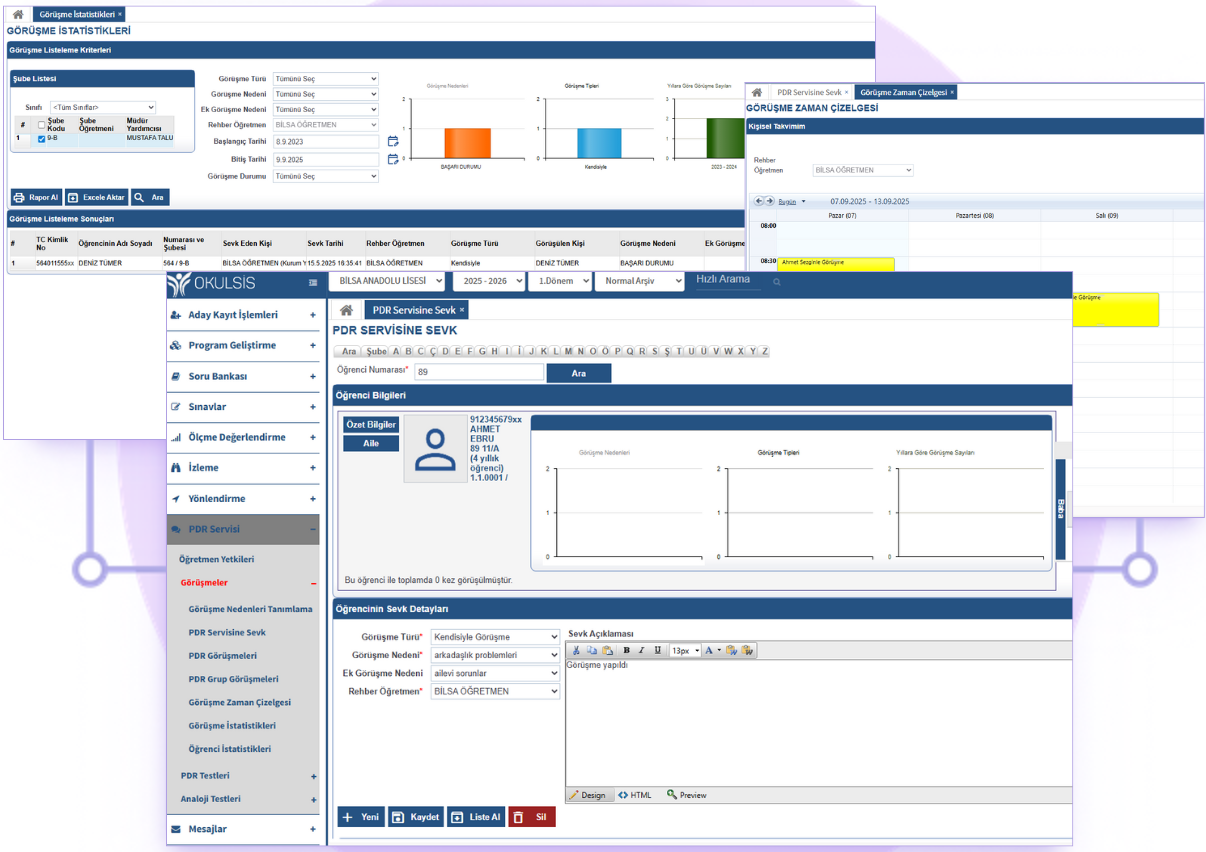

PSYCHOLOGICAL COUNSELING & GUIDANCE

All Components of Guidance Services

From individual counseling to vocational guidance, from candidate evaluation to parent communication - all your PDR processes are on a single platform.

Individual Interview Records

Record individual psychological counseling sessions with students based on date, duration, subject and result. Store the interview notes in a digital environment in accordance with the confidentiality policy. Monitor cases that require follow-up with automatic reminders.

Survey & Test Application

Apply PDR measurement tools such as interest inventory, personality test, sociometry, learning styles survey to students in a digital environment. Automatically evaluate results and generate individual feedback reports.

Prospective Student Evaluation

Apply readiness tests (Metropolitan, Gesell, etc.) to prospective students who will enroll in the school. Save the counselor interview notes. Digitally manage evaluation criteria and ranking results during the admission process.

Career guidance

Conduct career planning studies starting from the 9th grade. Systematically plan and follow up career promotions, information about higher education institutions, interest-ability tests and university choice counseling processes.

Referral & follow-up system

Follow up with students referred to the guidance service by teachers or administrators. Record the reason for referral, the status of the meeting, and the outcome. Create automatic alerts for students at risk for attendance, behavior or academics.

PDR Statistics & Reporting

View interview numbers, distribution of referral reasons, survey result averages and class-based PDR statistics with graphs. Automatically create periodic and annual PDR activity reports.

K-12
All Levels
Digital
Survey & test environment
Private
Session records
Automatic
Guidance activity reports

Bring Your PDR Services to Professional Standards

Manage all your PDR processes on the digital platform instead of interview notes in paper files, hand-tracked referral forms and manual survey evaluations. Provide systematic service across K-12 with a developmental, preventive and protective guidance approach.

Record individual psychological counseling meetings based on date, duration, subject title, meeting summary and steps to be followed. Plan and track group mentoring activities — classroom guidance, values ​​education workshops, social skills groups. In accordance with the confidentiality policy, only authorized PDR experts can access interview notes.

EASY START

PDR Service Cycle

Recognition, intervention and monitoring — the 3 basic steps of the developmental guidance approach.

1

Recognition & Evaluation

Get to know your students with surveys, tests, observation forms and interviews. Identify needs, strengths and risk areas.

2

Response & Support

Provide preventive and protective services through individual counseling, group guidance, classroom activities, and family meetings.

3

Monitoring & Reporting

Measure and improve the effectiveness of PDR services with conversation statistics, survey results and activity reports.

Frequently asked questions

Frequently asked questions about the guidance module.

How is the confidentiality of guidance meeting records ensured?

+

Only authorized PDR experts can access interview notes. With the role-based authorization system, school administrators can see statistical data but cannot access individual meeting details. All data is stored encrypted and managed in accordance with PDR privacy principles.

How does the candidate student evaluation process work?

+

The information of the families applying to the school is recorded, and a readiness or level determination test is applied to the prospective student. A counselor interview is held and grades are entered into the system. When accounting approval and other criteria are completed, the system automatically sorts according to the weights you specify.

What surveys and tests can we apply?

+

You can define common PDR measurement tools such as interest inventory, personality test, learning styles survey, sociometry, test anxiety scale, vocational orientation test and school adjustment survey into the system. You can also create surveys specific to your own kindergarten. All are applied digitally and scored automatically.

Can parents follow their children's PDR process?

+

Information that the PDR specialist deems appropriate to share can be shared with the family via the parent portal. Meeting appointments, general evaluation notes and suggestions are displayed on the parent screen. Individual counseling details are not shared due to confidentiality — but general guidance and suggestions can be forwarded to the parent.

Does it work integrated with the measurement and evaluation module?

+

Yes. Exam results and success analyzes in the measurement and evaluation module are automatically transferred to the guidance module. Automatic referral recommendations are created for students at academic risk. The PDR specialist can see the student's entire academic history and exam trends from the interview screen.

Make the best investment in your institution

What your team can do with Bilsa

Discover it now.